Thursday, December 10, 2009

ASSIGN_02 Current Trends

Security as an Afterthought
Posted Nov 11, 2009 - November 2009 Issue


If you've read the IT press at all these days, you know that SQL Injection (SI) attacks are very common and can be devastatingly effective. In fact, SI attacks-equally easy to execute against Oracle, MySQL, IBM DB2, or Microsoft SQL Server-are among the most common hacks on the Internet today. If a web application runs a relational database on the backend, it can be subject to an SI attack, which ironically, is among the easiest web hacks to prevent.

While plenty of SI attacks hit SQL Server database, Microsoft has done much to strengthen and reinforce SQL Server's attackable surface area. In fact, in the last couple releases, SQL Server has had fewer security holes and critical flaws than the other leading database platforms. After the SQL Slammer virus of the early 2000s, SQL Server made security a huge aspect of its feature set, and, as a database, is ahead of the pack in terms of security features. It is SQL Server users- its DBAs, developers, and IT managers-who bear the blame for security hacks that succeed against their systems.

So what is SI? An analogy might explain the ease of defending against an SI attack better than a full technical description (For a technical description, visit http://en.wikipedia.org/wiki/Sql_injection). Imagine you're driving home from work and see all the doors and windows open at a neighbor's house. You peek out the window as you lock up for bed that night. All their doors and windows are still wide open. You get ready to leave for work the next morning and see your neighbor driving away with all the doors and windows completely open. A few days later, the house is burglarized. Well, no wonder! They never even shut the door, let alone lock it. They'd probably be safe and secure today if they'd taken that simplest of steps.

SI is practically the same situation. All it takes to prevent SI is to ensure your web applications test for allowable values in their input fields, and send their own error messages, rather than the default. SI is ridiculously easy to prevent, and if I managed a team where this happened, I'd fire the responsible parties, on both the development and administration teams. We know as much about preventing SI attacks today as we did the very first time they occurred. If it happens to you-just like a burglary in a house where the doors are never shut-you must blame yourself, not the locks on the doors.

Microsoft has implemented many new and improved security features in the wake of the SQL Slammer virus. Their entire development process for SQL Server includes rigorous security checks. When SQL Server is installed today, most security holes and surface areas have been closed off by default, requiring the DBA to consciously open them up after installation.

There also are a few best practices to keep in mind. First, as with disaster recovery, you should plan for the inevitable attack ahead of time. To prevent security breaches, ensure that applications and services run with the least possible privileges. Monitor login activity and raise an alarm when too many failed logins occur within a certain time period. Make sure applications run under their own account, not SA, and that guest accounts and the public role are dropped or not available. Finally, disable any system and extended stored procedures on your SQL Servers that aren't explicitly needed to support production operations.


Brasher’s Auto Auction Group Makes Bid for New Database Technology

Posted Nov 11, 2009 - November 2009 Issue


A modern architecture, system stability and strong behind-the-scenes support are key attributes to consider when evaluating new database technology.

The Brasher's Auto Auction group is among the oldest auto auction companies in the country, serving major markets throughout the western U.S. Brasher's remarkets vehicles for auto dealers, manufacturers, rental car companies, banks, finance and leasing institutions, and offers a full range of services, including reconditioning, inspections, transportation and inventory financing, and operates auto auction facilities in Salt Lake City, Utah; Reno, Nev.; Sacramento, Calif.; Eugene, Or.; Portland, Or.; and Boise, Idaho.

Generating in excess of $1.5 billion in vehicle sales annually and employing roughly 1,200 people, Brasher's is also a technology innovator. Brasher's was among the first auctions in the industry to implement a computerized auction management system, and Brasher's was also one of the first auctions to offer vehicles on the internet in the late 1990s. With two partner auctions, Brasher's founded the Auction Pipeline, which is now a premier online sales channel for independent auctions in the U.S.

In December 2008, Brasher's initiated a phased roll-out of its enterprise applications on the InterSystems CACHÉ high-performance database with MultiValue technology, concluding the implementation in January 2009. In all, the migration involved more than 8,000 programs and cataloged procedures ranging from accounting applications through real-time bid processing systems in auction venues. In going live with CACHÉ at each location, says Ty Brewer, Brasher's CIO, "our goal was for people to go home on a Friday and come back on a Monday and not notice anything different, other than things being faster. By and large, that's exactly what happened."

After deciding to move from its existing vendor, Brasher's initial evaluation of its database technology options began in December 2007, Brewer explains.

Brewer and other members of his team made a spreadsheet outlining the different feature sets of alternative products they wanted to evaluate and ranked each of those feature sets by relevance to their operation. They sought a stable platform which Brasher's could rely on as it continues to grow. Among other considerations was Brasher's use of PROC, a MultiValue procedural language, for its menuing system. "We didn't want to have to rewrite a lot of existing PROC code," explains Brewer. The company also wanted the ability to do phased migration across its six locations in order to have a safer implementation.

After considering its choices, Brasher's opted for CACHÉ because it best fit his company's needs, Brewer explains. "We just went through in a very calculated approach, looking at the positives and negatives of the different vendors that were out there. By far and away, this product of InterSystems' - CACHÉ - stood out as being our best move," he says. A leading database in enabling transactional systems, CACHÉ enables rapid web application development, high transaction processing speed, scalability and real-time queries against transactional data.

"The overarching and most compelling reason was the more modern architecture. The way they take MV and tie it into an object-oriented model is really phenomenal and it greatly expanded our toolset and how we can get at our data," Brewer notes. "We did a lot of benchmarking on the different platforms and in most every case, the InterSystems product performed orders of magnitude better. The toolset they provide is very rich. They have a lot of tools that enable commonly performed operations to be done very easily, the web service consumption and creation is fantastic, and we are able to develop code a lot quicker with their environment." Moreover, he adds, due to CACHÉ's powerful debugger, the move has enabled the Brasher's team to find bugs that Brewer is convinced they would not have been able to locate otherwise. "We have cleaned up several issues that have plagued our system for some time, and we have been able to improve our overall system stability just from being able to better clean up our code."

With the decision made by the early spring of 2008 to go with CACHÉ, the team opted to go to the annual InterSystems developer conference, which turned out, according to Brewer, to be another major selling point. "Just the community of developers and the general culture was very favorable and very cutting edge. It was a contrast to what we would see at other MV conferences."

Reflecting on the move now, Brewer says he has no changer's remorse. "The biggest concern was system stability. It has been a major issue that we have wanted to ensure and our system stability now is many times better than it was previously." Another improvement, he notes, is that Brasher's backup windows before the migration used to take the company offline at night. "We were forced off of our system for several hours at each location previously and with the backup procedures that CACHÉ provides, with journaling and some different things, it allows for us to really minimize that window of time where we need to have people off of the system. And frankly, now, for backups, they don't have to anymore. We just have a few processes where it might require a few minutes a day now where we are offline."

And, Brewer adds, a final added benefit of the move to CACHÉ has been that the support has been "world-class." If there is a problem, he says, InterSystems is on it. "We set the priority. If we say something is a ‘crisis priority,' they have people that work on it 24/7. We have witnessed that and we have absolutely no complaint whatsoever about their support. We would recommend them with no reservations."


Wednesday, November 18, 2009

ASSIGN_01

1. Hierarchical V.S. Relational
* A hierarchy (Greek: hierarchia (ἱεραρχία), from hierarches, "leader of sacred rites")[1] is an arrangement of items (objects, names, values, categories, etc.) in which the items are represented as being "above," "below," or "at the same level as" one another and with only one "neighbor" above and below each level. These classifications are made with regard to rank, importance, seniority, power status or authority.[2][3] A hierarchy of power is called a power structure. Abstractly, a hierarchy is simply an ordered set or an acyclic graph.
* A relational database matches data by using common characteristics found within the data set. The resulting groups of data are organized and are much easier for people to understand.

For example, a data set containing all the real-estate transactions in a town can be grouped by the year the transaction occurred; or it can be grouped by the sale price of the transaction; or it can be grouped by the buyer's last name; and so on.

Such a grouping uses the relational model (a technical term for this is schema). Hence, such a database is called a "relational database."

The software used to do this grouping is called a relational database management system. The term "relational database" often refers to this type of software.

Relational databases are currently the predominant choice in storing financial records, manufacturing and logistical information, personnel data and much more.

Sunday, August 16, 2009

My_Idea_Is

A. Discuss what you have learned and understood about what Relational DBMS is, so far.
* Database is a program that lets you input and manage data.
When you store data to your computer, the DBMS then will play its role. It will make a data structure to your data you just enter. Every data you stored to your computer has there own respective structure. After having the structure, the DBMS then will place your data with its structure to a container which is called as database. In database, all your data are well arranged and managed.


B. Define how each of the following fit and function within the framework of relational DBMS systems:

1. Key Fields - keys that are used in database.
- is a field or set of fields of a database (typically a relational database) table which together form a unique identifier for a database record (a table entry). The aggregate of these fields is usually referred to simply as "the key". Key fields also define searches.

2. Database Records - are data stored in database.
- also called a record or tuple—represents a single, implicitly structured data item in a table. In simple terms, a database table can be thought of as consisting of rows and columns or fields. Each row in a table represents a set of related data, and every row in the table has the same structure.

3. Data Queries - used to show data in many different ways.
- is a form of questioning, in a line of inquiry.

4. Data Types - are data that the DBMS can handle.
- (or datatype) in programming languages is a set of values and the operations on those values.

5. Data Forms - used to show data through user-friendly interface.
- are applicable to individual tables; to say that an entire database is in normal form n is to say that all of its tables are in normal form n.

6. Tables/database files - used to input and manage data.
- is a set of data elements (values) that is organized using a model of vertical columns (which are identified by their name) and horizontal rows. A table has a specified number of columns, but can have any number of rows. Each row is identified by the values appearing in a particular column subset which has been identified as a candidate key.

Table is another term for relations; although there is the difference in that a table is usually a multi-set (bag) of rows whereas a relation is a set and does not allow duplicates. Besides the actual data rows, tables generally have associated with them some meta-information, such as constraints on the table or on the values within particular columns.

The data in a table does not have to be physically stored in the database. Views are also relational tables, but their data are calculated at query time. Another example are nicknames, which represent a pointer to a table in another database.


7. Relationships (Table Linkage) - used to show data form one table to another through linking.
- is based on the relational model as introduced by E. F. Codd. Most popular commercial and open source databases currently in use are based on the relational model.

My_Idea_Is

Saturday, July 4, 2009

MY_ASSIGNMNT

A. What are data types?

A data type in a programming language is a set of data with values having predefined characteristics. Examples of data types are: integer, floating point unit number, character, string, and pointer. Usually, a limited number of such data types come built into a language. The language usually specifies the range of values for a given data type, how the values are processed by the computer, and how they are stored.With object-oriented programming, a programmer can create new data types to meet application needs. Such an exercise as known as "data abstraction" and the result is a new class of data. Such a class can draw upon the "built-in" data types such as number integers and characters. For example, a class could be created that would abstract the characteristics of a purchase order. The purchase order data type would contain the more basic data types of numbers and characters and could also include other object defined by another class. The purchase order data type would have all of the inherent services that a programming language provided to its built-in data types.Languages that leave little room for programmers to define their own data types are said to be strongly-typed languages.

B. What role do they play in a database?

Data Types -- The Easiest Part of Database DesignDatabase design can be very complicated, and it truly is an art as opposed to a science; sometimes there are multiple correct ways to model the same data with pros and cons to each. I can understand that normalization can be tricky to comprehend and to implement, and that concepts like stored procedures and foreign keys and even indexes and constraints can take time to grasp.But -- what about Data Types? They are so basic, so simple, so fundamental; not only for database design, but for any sort of programming in general ... what excuse is there for not using correct data types for the columns in a table design?I see it time and time again in the SQLTeam forums -- "dates" that don't sort properly, "numbers" that don't add correctly, "boolean" columns containing 10 different values, invalid entries that somehow show up in "date" columns, and so on ... Of course, since we are rarely provided any DDL to review, it often takes dozens of posts going back and forth until we finally realize: "wait ... you aren't using a datetime data type to store these dates??? Arggh!!"In short, even a poorly designed database, with one giant "master" table with no normalization or logic anywhere in sight, should still at least use a Money data type to store currency values!Perhaps the confusion comes from Excel users, where data types are handled behind the scenes ... or maybe "old school" VB programmers used to using variant data types (or worse -- undeclared variables!) to store values... But when you design a table in any database, you are always explicitly stating the data types of the columns -- there's nothing hidden, or no option to ignore them. You must declare a data type when creating a column, so how can anyone justify using VARCHAR to store a date?

C. Enumerate 3 data types of DBMS and explain.

1. Fixed-length textThe char data type is used to store fixed-length text with up to 255 characters. Specifying the number of characters to store limits how big the column will be. Text values retrieved from a char column are padded with spaces, if necessary, to the size of the column. The char data type is not available from the Access designer.The following statement creates a table with a 10-character text column and a 255-character text column, both with Unicode compression:CREATE TABLE T1 (c1 char(10) WITH compression, c2 char WITH compression)2. Variable-length textThe varchar data type is used to store variable-length text with up to 255 characters.Text values retrieved from a varchar column are trimmed of any trailing spaces.The following statement creates a table with a 10-character text column and a 255-character text column, both with Unicode compression:CREATE TABLE T2 (c1 varchar(10) WITH compression, c2 varchar WITH compression)3. Text BLOBThe longchar data type is used to store variable-length text with an unspecified number of characters, limited only by the maximum size of JET database files (2 GB – about 1 billion uncompressed Unicode characters).Some software libraries are able to handle longchar columns as basic text columns, but others must use BLOB techniques for accessing their data. In particular, the ADO components so often used in Visual Basic, VBA and ASP applications can access longchar columns as basic text when using the JET 4.0 OLE-DB provider to access the database, but must use BLOB handling routines (GetChunk / AppendChunk) when using an ODBC connection.

Friday, June 26, 2009

MV v.s. DataF

Characteristics of Memory Variable:
* Memory variable files are a way to store the status of memory variables that are currently stored in memory and use them later in the same program or in another session of FoxPro.
The memory location holds values- perhaps numbers or text or more complicated types of data like a payroll record. Operating Systems load programs into different parts of RAM so there is no way of knowing exactly which memory location will hold a particular variable before the program is run. By giving a variable a symbolic name like "employee_payroll_id" the compiler or interpreter can always work out where to store the variable in memory.

Characteristics of Data Field:
* A data field is the smallest subdivision of the stored data that can be accessed. A data field can be used to store numerical information such as price, count or a date or time, or even a data and time. A pair of data fields can be used in combination to hold a geo-spatial coordinate. Also, a data field can be used to hold a block of text. A data field takes up permanent storage within the data-store. The field may contain data to be entered as well as data to be displayed.

Saturday, June 20, 2009

TERM CONTRAST

1. Differentiate information V.S. data.
* Information - collected facts & data about a specific subjects.
* Data - information, often in the form of facts / figures obtained from experiments / surveys, used as a basis for making calculations / drawing conclusions.

2. Differentiate data storage V.S. computer storage.
* Data storage - (information storage & retrieval) is a term used to describe the organization, storage, location and retrieval of encoded information in computer systems.
* Computer storage - any physical device in / on which computer iformation can be kept.

3. Differentiate operating system V.S. computer system.
* Operating system - the basic software that controls a computer.
* Computer system - a system of one or more computers and associated software with common storage.

Saturday, March 7, 2009

SORT

What is Data Structure?

1. For me, data structure is the study in relation to computer science or world, on how computer store or keep data from hard copy to soft copy. Also, how to gather data from the computer and bring it in real world to make it useful. There are many ways on how to store data in a computer just like using stalks, queues, arrays, lists and trees. These are examples of data structure. Each of these data structure has there unique steps in storing data.


2. A means of storing a collection of data. Computer science is in part the study of methods for effectively using a computer to solve problems, or in other words, determining exactly the problem to be solved. This process entails (1) gaining an understanding of the problem; (2) translating vague descriptions, goals, and contradictory requests, and often-unstated desires, into a precisely formulated conceptual solution; and (3) implementing the solution with a computer program. This solution typically consists of two parts: algorithms and data structures.

Source: Sci-Tech Encyclopedia


3. The physical layout of data. Data fields, memo fields, fixed length fields, variable length fields, records, word processing documents, spreadsheets, data files, database files and indexes are all examples of data structures.

Source: Computer Desktop Encyclopedia


4. Way in which data are stored for efficient search and retrieval. The simplest data structure is the one-dimensional (linear) array, in which stored elements are numbered with consecutive integers and these numbers access contents. Data items stored nonconsecutively in memory may be linked by pointers (memory addresses stored with items to indicate where the "next" item or items in the structure are located). Many algorithms have been developed for sorting data efficiently; these apply to structures residing in main memory and also to structures that constitute information systems and databases.

Source: Britannica Concise Encyclopedia


5. A data structure in computer science is a way of storing data in a computer so that it can be used efficiently. It is an organization of mathematical and logical concepts of data. Often a carefully chosen data structure will allow the most efficient algorithm to be used. The choice of the data structure often begins from the choice of an abstract data type. A well-designed data structure allows a variety of critical operations to be performed, using as few resources, both execution time and memory space, as possible. Data structures are implemented by a programming language as data types and the references and operations they provide.

Source: Wikipedia


6. A data structure is a specialized format for organizing and storing data. General data structure types include the array, the file, the record, the table, the tree, and so on. Any data structure is designed to organize data to suit a specific purpose so that it can be accessed and worked with in appropriate ways. In computer programming, a data structure may be selected or designed to store data for the purpose of working on it with various algorithms.

Source: SQLServer.com


7. A data structure is a way of organizing data that considers not only the items stored, but also their relationship to each other. Advance knowledge about the relationship between data items allows designing of efficient algorithms for the manipulation of data.

Source: www.geocities.com/hemanthb2010/datastructure.doc


8. A data structure in computer science is a way of storing data in a computer so that it can be used efficiently. It is an organization of mathematical and logical concepts of data.

Source: commons.wikimedia.org


9. A data structure in computer science is a way of storing data in a computer so that it can be used efficiently. It is an organization of mathematical and logical concepts of data. Often a carefully chosen data structure will allow the most efficient algorithm to be used. The choice of the data structure often begins from the choice of an abstract data type. A well-designed data structure allows a variety of critical operations to be performed, using as few resources, both execution time and memory space, as possible. Data structures are implemented by a programming language as data types and the references and operations they provide.

Source: Wikipedia


10. Data structures are containers that contain objects of data types. There are several common data structures, and each has its own behaviour and application. Common data structures are: arrays of one or more dimensions, stacks, linked lists (singly and doubly linked), queues, and trees (balanced, binary, and so on). There are others. Understanding data structures helps the student understand most of them, how they behave, and when to use which of them.

Source: http://www.cdacmumbai.in/index.php/cdacmumbai/education/fpgdst/fpgdst_topics_concepts

TYPES OF DATA STRUCTURES:


a. HASH TREE - In cryptography and computer science Hash trees or Merkle trees are a type of data structure which contains a tree of summary information about a larger piece of data – for instance a file – used to verify its contents. Hash trees are an extension of hash lists, which in turn is an extension of hashing. Hash trees where the underlying hash function is Tiger are often called Tiger trees or Tiger tree hashes.

How does it work? :

* A hash tree is a tree of hashes in which the leaves are hashes of data blocks in, for instance, a file or set of files. Nodes further up in the tree are the hashes of their respective children. Most hash tree implementations are binary (two child nodes under each node) but they can just as well use many more child nodes under each node.
Usually, a cryptographic hash function such as SHA-1, Whirlpool, or Tiger is used for the hashing. If the hash tree only needs to protect against unintentional damage, the much less secure checksums such as CRCs can be used.
In the top of a hash tree there is a top hash (or root hash or master hash). Before downloading a file on a p2p network, in most cases the top hash is acquired from a trusted source, for instance a friend or a web site that is known to have good recommendations of files to download. When the top hash is available, the hash tree can be received from any non-trusted source, like any peer in the p2p network. Then, the received hash tree is checked against the trusted top hash, and if the hash tree is damaged or fake, another hash tree from another source will be tried until the program finds one that matches the top hash.
The main difference from a hash list is that one branch of the hash tree can be downloaded at a time and the integrity of each branch can be checked immediately, even though the whole tree is not available yet. This can be an advantage since it is efficient to split files up in very small data blocks so that only small blocks have to be redownloaded if they get damaged. If the hashed file is very big, such a hash tree or hash list becomes fairly big. But if it is a tree, one small branch can be downloaded quickly, the integrity of the branch can be checked, and then the downloading of data blocks can start.


b. An AVL tree is a self-balancing binary search tree, and it is the first such data structure to be invented. In an AVL tree, the heights of the two child subtrees of any node differ by at most one; therefore, it is also said to be height-balanced. Lookup, insertion, and deletion all take O(log n) time in both the average and worst cases, where n is the number of nodes in the tree prior to the operation. Insertions and deletions may require the tree to be rebalanced by one or more tree rotations.

How does it work? :

The basic operations of an AVL tree generally involve carrying out the same actions as would be carried out on an unbalanced binary search tree, but preceded or followed by one or more operations called tree rotations, which help to restore the height balance of the subtrees.
Pictorial description of how rotations cause rebalancing tree, and then retracing one's steps toward the root updating the balance factor of the nodes. If the balance factor becomes -1, 0, or 1 then the tree is still in AVL form, and no rotations are necessary. If the balance factor becomes 2 or -2 then the tree rooted at this node is unbalanced, and a tree rotation is needed. At most a single or double rotation will be needed to balance the tree.
There are basically four cases, which need to be accounted for, of which two are symmetric to the other two. For simplicity, the root of the unbalanced subtree will be called P, the right child of that node will be called R, and the left child will be called L. If the balance factor of P is 2, it means that the right subtree outweighs the left subtree of the given node, and the balance factor of the right child (R) must then be checked. If the balance factor of R is 1, it means the insertion occurred on the (external) right side of that node and a left rotation is needed (tree rotation) with P as the root. If the balance factor of R is -1, this means the insertion happened on the (internal) left side of that node. This requires a double rotation. The first rotation is a right rotation with R as the root. The second is a left rotation with P as the root.
To search for information in AVL tree is performed exactly as in an unbalanced binary search tree. Because of the height-balancing of the tree, a lookup takes O(log n) time. No special provisions need to be taken, and the tree's structure is not modified by lookups. If each node additionally records the size of its subtree (including itself and its descendants), then the nodes can be retrieved by index in O(log n) time as well.Once a node has been found in a balanced tree, the next or previous node can be obtained in amortized constant time.


c. A Radix tree, Patricia trie/tree, or crit bit tree is a specialized set data structure based on the trie that is used to store a set of strings. In contrast with a regular trie, the edges of a Patricia trie are labelled with sequences of characters rather than with single characters. These can be strings of characters, bit strings such as integers or IP addresses, or generally arbitrary sequences of objects in lexicographical order. Sometimes the names radix tree and crit bit tree are only applied to trees storing integers and Patricia trie is retained for more general inputs, but the structure works the same way in all cases.

How does it work? :

* The radix tree is easiest to understand as a space-optimized trie where each node with only one child is merged with its child. The result is that every internal node has at least two children. Unlike in regular tries, edges can be labeled with sequences of characters as well as single characters. This makes them much more efficient for small sets (especially if the strings are long) and for sets of strings that share long prefixes.
It supports the following main operations, all of which are O(k), where k is the maximum length of all strings in the set:
• Lookup: Determines if a string is in the set. This operation is identical to tries except that some edges consume multiple characters.
• Insert: Add a string to the tree. We search the tree until we can make no further progress. At this point we either add a new outgoing edge labeled with all remaining characters in the input string, or if there is already an outgoing edge sharing a prefix with the remaining input string, we split it into two edges (the first labeled with the common prefix) and proceed. This splitting step ensures that no node has more children than there are possible string characters.

A common extension of radix trees uses two colors of nodes, 'black' and 'white'. To check if a given string is stored in the tree, the search starts from the top and follows the edges of the input string until no further progress can be made. If the search-string is consumed and the final node is a black node, the search has failed; if it is white, the search has succeeded. This enables us to add a large range of strings with a common prefix to the tree, using white nodes, then remove a small set of "exceptions" in a space-efficient manner by inserting them using black nodes.

Thursday, February 5, 2009

Data Structure(graph)

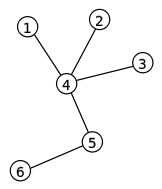
A. Graph data structures are non-hierarchical or not inordered and therefore suitable for data sets where the each elements are interconnected in many ways. For example,a computer network can be modeled with graph.
We are assigned to show how graph, store data. A tree data structure can be considered as a special form of a graph data structure(acyclic). A graph is composed of nodes where the data are placed. A tree is a graph in which any two vertices are connected by exactly one path.
Data Value_1
Data Value_2
Data Value_3
Data Value_4
Data Value_5
Data Value_6

B. Figure Sample: